Monolith
A small voice companion that rides in my passenger seat, knows where I am and what the air in the cabin is like, and answers when I press a button.
The question
What would an ambient companion feel like if it actually knew its surroundings? Not a phone on a mount, not another screen to tap, but something that sits quietly next to me, keeps track of location, altitude, weather and cabin air, and only speaks when I ask or when something matters.
I wanted the answer to be a physical object with restraint built in: mostly silent, glanceable at a red light, and useful the moment I ask it something like "how's the air in here?"
What I built
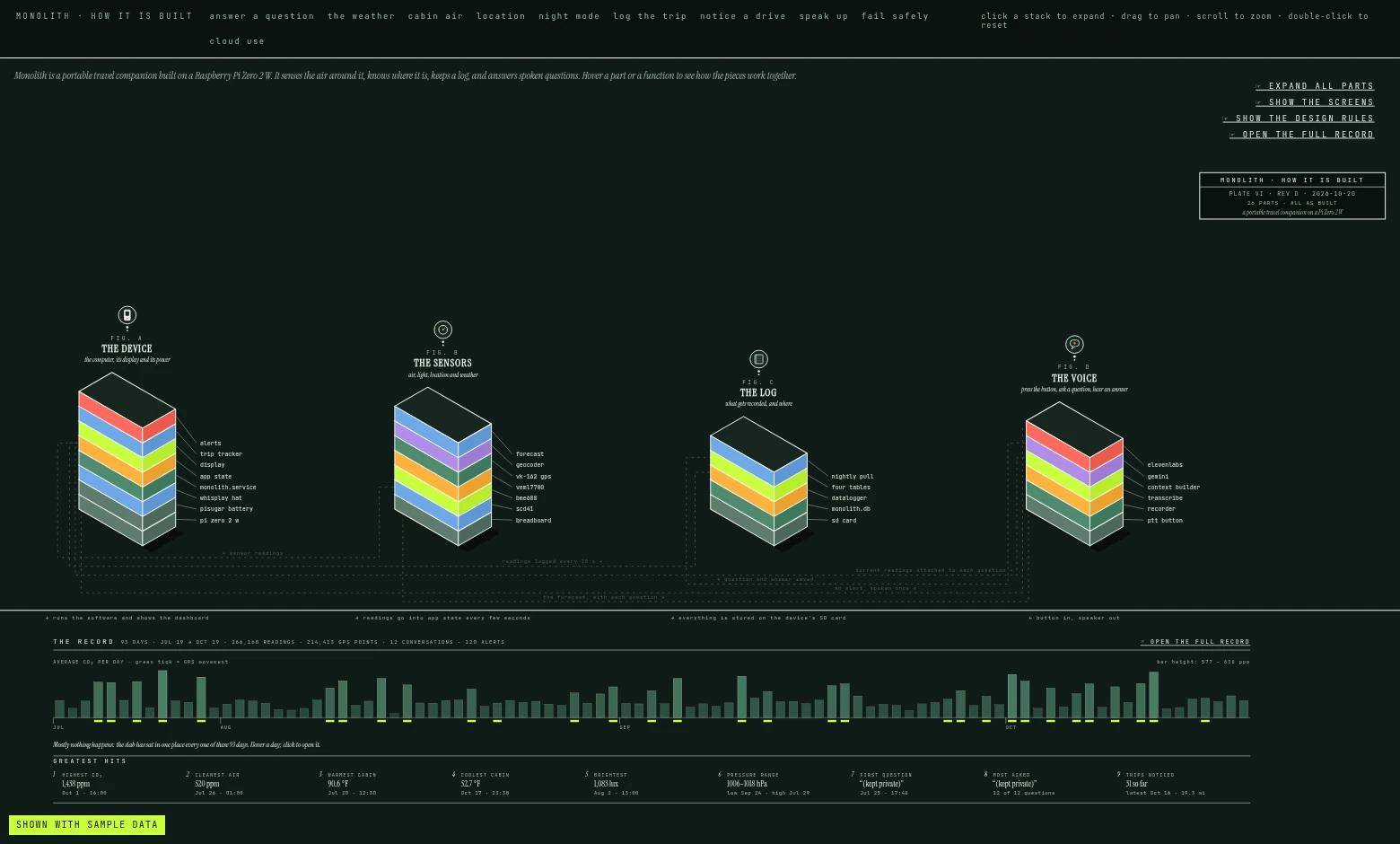
Monolith is a Raspberry Pi Zero 2 W wearing a PiSugar WhisPlay HAT, which gives it a small 240×280 LCD, a button, a mic and a speaker. A PiSugar battery keeps it running through short power gaps. A USB GPS dongle gives it location and speed, and a little I2C sensor cluster on a breadboard reads cabin CO₂, temperature and humidity (SCD41), air pressure for altitude (BME688) and ambient light for auto-dimming (VEML7700).
The flow is simple. I hold the button and ask a question. Monolith transcribes it, attaches the live sensor and GPS readings, asks the model, and speaks the answer while the text streams onto the screen. When I'm not asking anything, the screen is an always-on dashboard. Every reading and exchange goes into a local SQLite trip log, and it has been logging every day since July 19.
Screen states, refreshed
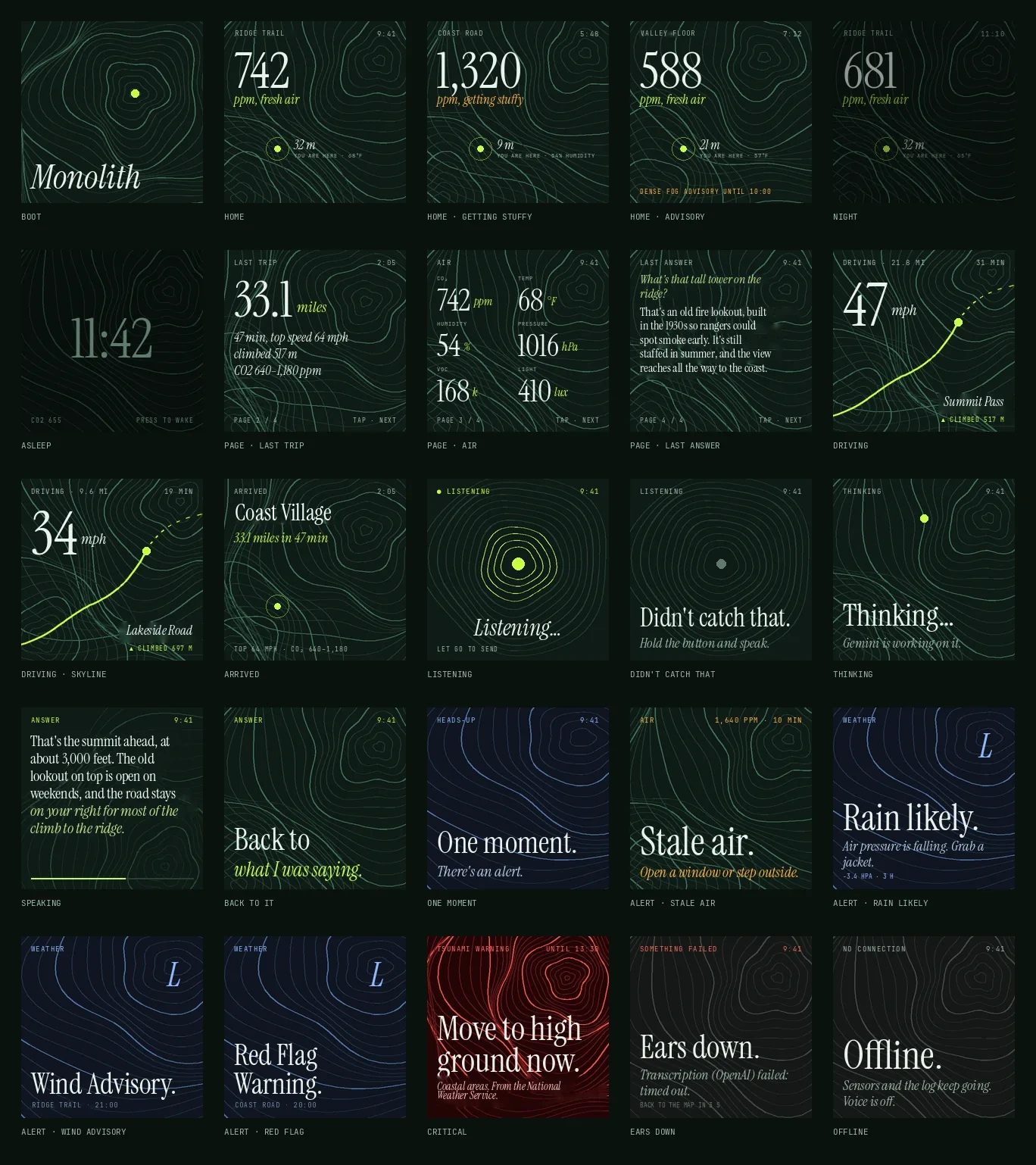
This is where the design landed. Below is how it got there.
How it's built
Design process
I explored the design language in HTML before a single pixel hit the LCD, always at the real 240×280 size so I could judge it on the device's terms.
Brutalism won, so I pushed it ten more ways, from monumental and serious to openly playful, to find where the edges were.
Then I applied the winning style to every screen the device needs, boot through critical alert. The test was whether "one thing, holding everything" survives the full system or breaks down somewhere.
The higher fidelity pass pinned it down: six type sizes, three colors plus one, a three-tier grid with a fixed 14px edge, and four motion behaviors. The LCD is mostly seen in peripheral vision while driving, so color has to mean something or nothing at all.
Motion and naming came next. The project took its design language as its name: a quiet slab that knows things and reveals them when asked. The boot sequence is five frames in about three seconds, and the first thing you see is nothing.
Later I drew the whole build as an exploded, isometric plate, and tested it in seven palettes for contrast, including for color-deficient vision.
How it works
- I hold the button and ask. The screen says it's listening.
- OpenAI transcribes the recording.
- Monolith adds live context: CO₂, temperature, humidity, pressure, and with a GPS fix, place, speed and altitude.
- Gemini 2.5 Flash streams an answer back onto the screen.
- ElevenLabs speaks it, sentence by sentence, with OpenAI or local Piper voices as fallbacks.
- The exchange is logged to SQLite, and after 30 seconds the screen returns to the dashboard.
Every part fails soft on its own. If a sensor drops, its value goes blank. If GPS is unplugged, the answers just lose their place name. With no Wi-Fi it shows an offline screen and keeps sensing.
What I learned
- Context beats cleverness. Handing the model the live readings with every question makes ordinary answers feel grounded, with no tools needed.
- Designing at the real size, in the browser, saved me from choices that looked good on a big screen and failed at a glance.
- Restraint is a feature. One number per screen and one red reads as quality on cheap hardware.
- Hardware fails in boring ways: a cracked HAT, flaky buses, power gaps. Graceful degradation mattered more than any single feature.
What's next
- Spoken alerts from the sensors and the National Weather Service, with a polite interrupt that finishes a sentence before cutting in.
- A library of short pre-recorded chimes and phrases so alerts cost nothing to play.
- Travelogues: after each trip, a grounded, sourced note about where I drove, written into my Obsidian vault.
- A weighted, tilted base so it sits better on the seat.